Choose the SQL view that matches your question. A SELECT/WITH diagram explains where output columns come from and how sources connect. A CREATE TABLE/ALTER TABLE ADD diagram explains tables, columns and keys.
SQL is analyzed locally and is never executed. The tool does not contact your database.
Preview a script before creating a diagram
- Drop a
.sqlor.ddlfile, choose Import, or open Import SQL script. - On a phone, use Diagram actions → Import SQL script.
- Enter the diagram name and paste the SQL script, or choose Load SQL file.
- Choose Preview query for a SELECT/WITH script or Preview schema for definitions.
- Review the counts, objects, relationships and import notes.
- Choose Create diagram.
Preview runs in a background worker and creates no project until you choose Create diagram. Changing the script or name clears the preview. Cancel aborts pending analysis. An error retains the input so you can correct it; unsupported input cannot create an empty or misleading partial query diagram.
Follow a SELECT from sources to outputs
Consider an organization query where the same business table plays two roles:
SELECT DISTINCT
  b.bu_id,
  invoice_org.bu_name AS invoice_name,
  CASE WHEN totals.amount IS NULL THEN 0
       ELSE totals.amount END AS amount
FROM business b
LEFT JOIN business invoice_org
  ON b.bu_send_bills_to = invoice_org.bu_id
LEFT JOIN (
  SELECT customer_id, SUM(amount) AS amount
  FROM invoices
  WHERE state <> 'Cancelled'
  GROUP BY customer_id
) totals ON b.bu_id = totals.customer_id
WHERE b.active = 1;
After creation, you should see separate source objects for b and invoice_org, a query block/result for the totals subquery, and a final result with three ordered outputs.
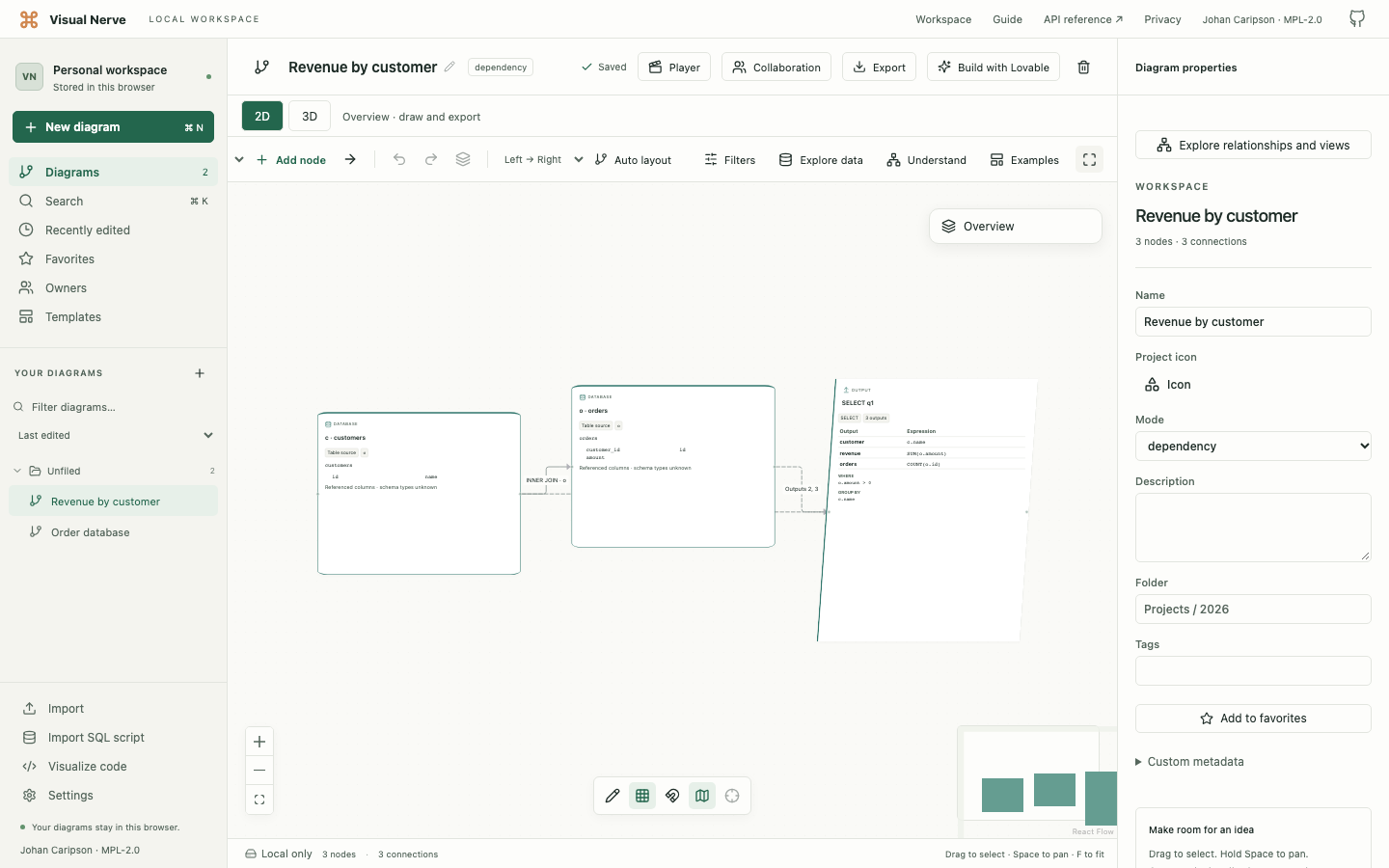
Read it in this order:
- Select a source and inspect its qualified table name and alias.
- Select a JOIN connection and read its type and condition.
- Select a derived-table or CTE result to understand its local scope.
- Select the final result and follow an output’s expression and referenced columns.
- Inspect WHERE, GROUP BY, HAVING, ORDER BY and other retained clauses in Properties.
INNER/LEFT/RIGHT/FULL/CROSS joins retain their types and conditions. Data-flow and lineage connections explain which sources contribute to a result. Nested subqueries and correlated references retain scope information.
On a phone, tap an object or relationship and choose Edit to read the scrolling Properties sheet. Long expressions are available there even when a card has a compact summary.
Resolved, unresolved and ambiguous references
| Label | Meaning |
|---|---|
| Resolved | The parsed structure binds the reference to a source in scope. |
| Unresolved | The reference cannot be safely bound from the imported structure. |
| Ambiguous | More than one source could supply it. |
| Wildcard | * remains explicit; the tool does not invent unknown database columns. |
Without database schema, an unqualified column shared by multiple sources may remain ambiguous. Duplicate output aliases are retained in their original order and generate a warning. This matters when two expressions have accidentally been given the same output name.
The importer recognizes DISTINCT, explicit/implicit aliases, schema-qualified and quoted names, CASE, function calls, aggregates, casts such as ::string::date, common clauses, CTEs and derived tables.
The diagram shows logical query structure. It does not know returned rows, live cardinalities, indexes, inferred database types or the optimizer’s physical execution plan.
Turn table definitions into a schema
Try:
CREATE TABLE customers (
  id INTEGER PRIMARY KEY,
  email VARCHAR(320) NOT NULL UNIQUE
);

CREATE TABLE orders (
  id INTEGER PRIMARY KEY,
  customer_id INTEGER NOT NULL,
  total DECIMAL(12, 2),
  CONSTRAINT orders_customer_fk
    FOREIGN KEY (customer_id) REFERENCES customers(id)
    ON DELETE RESTRICT
);

ALTER TABLE orders ADD created_at TIMESTAMP;
Each table becomes a database object. The orders foreign key points from the referencing child table to the referenced customer table.
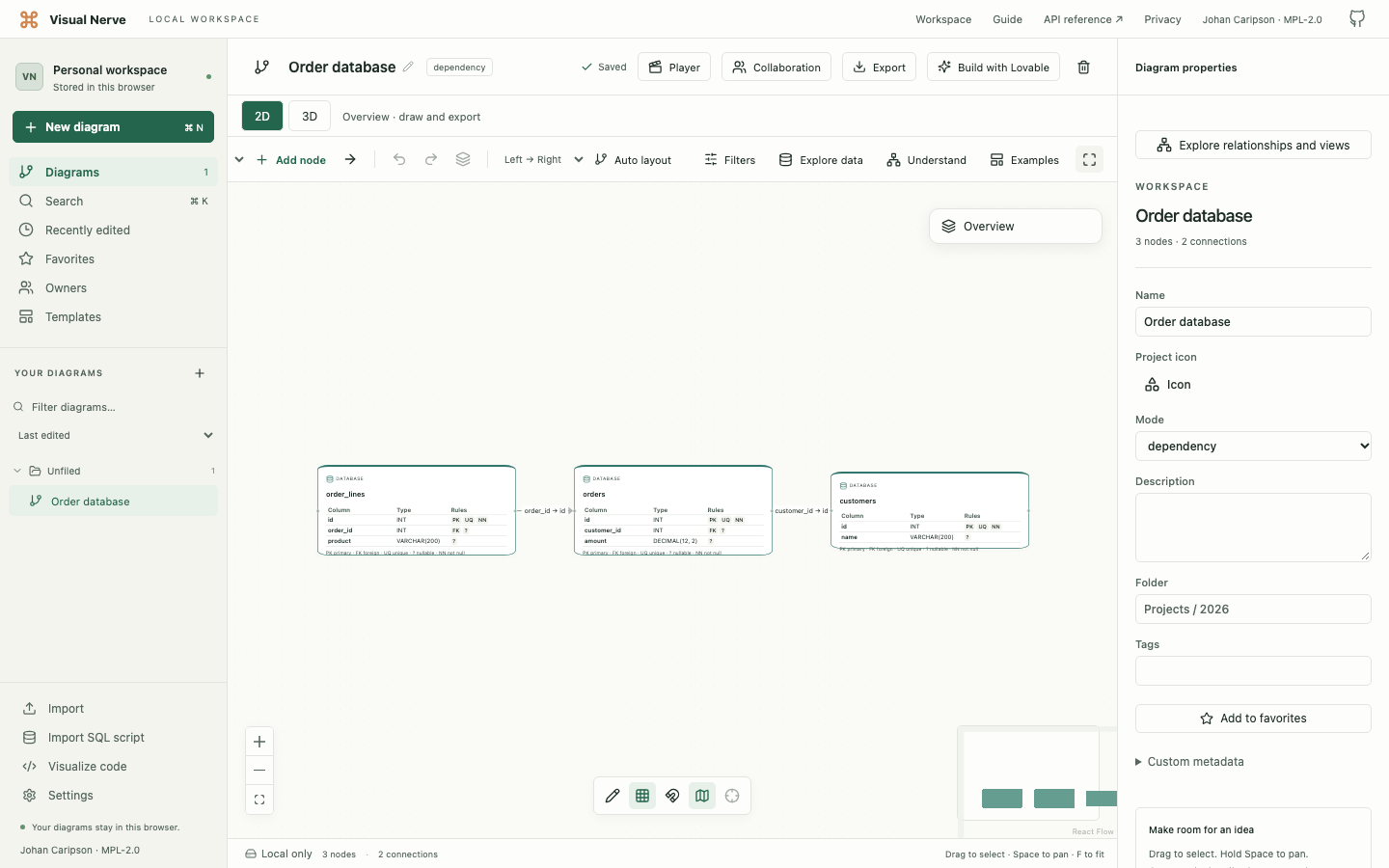
Common PostgreSQL, MySQL and SQL Server definitions are supported:
- CREATE TABLE columns, types and nullability.
- Inline and table-level primary, unique and foreign keys.
- ALTER TABLE ADD columns or key constraints.
- Composite keys with their column order retained.
- Schema-qualified, double-quoted, backtick and bracketed identifiers.
- References to tables declared later in the script.
- Declared ON DELETE and ON UPDATE actions.
Read table cards and foreign keys
Cards show up to 12 columns. Rule badges mean:
| Badge | Meaning |
|---|---|
| PK | Primary key. |
| FK | Foreign key. |
| UQ | Unique. |
| ? | Nullable. |
| NN | Not null. |
Select a table to inspect its complete schema, primary keys and unique keys in Properties. Large column lists use Previous columns / Next columns, with 100 columns per page. Select a foreign-key connection for its constraint name, ordered column pairs and delete/update actions.
External table · definition missing means a referenced definition is absent or could not be resolved unambiguously. Missing columns and keys remain unknown. An omitted referenced-column list can use a primary key declared in the script; otherwise the reference remains unresolved.
Edit and investigate the imported graph
You can move or rename tables and query objects, connect them to other objects, choose colors/icons, assign owners/status, add descriptions and draw annotations. These edits use ordinary local saving and Undo/Redo.
Reconnecting a parsed foreign key to a different table turns it into a manual relationship and removes its original constraint column pairs. Undo restores the original reference.
Use Explore data → Data quality for structure checks. Explore relationships and views can focus a neighborhood or path and save perspectives. Refresh source replaces an existing SQL schema after reviewing changes; it does not rerun SELECT queries.
Unsupported statements and migration scripts
Queries using UNION/INTERSECT/EXCEPT, recursive CTEs, QUALIFY, LATERAL, table functions or wildcard modifiers such as EXCLUDE/REPLACE/RENAME/ILIKE are rejected explicitly. Import a supported query separately after reviewing the error.
A mixed CREATE/SELECT script uses schema mode and reports the skipped SELECT statements. Separate the SELECT to visualize its sources and lineage.
DDL imports ignore INSERT/COPY rows, procedure bodies and unsupported statements. DROP, RENAME, MODIFY and unsupported ALTER actions are not applied and produce notes. Inherited definitions and CREATE TABLE AS/LIKE/OF/PARTITION variants are not imported as complete table definitions.
Therefore a migration file’s diagram represents the recognized CREATE/ADD definitions, not necessarily the database’s final state after every migration operation. Read the notes before relying on it.
Saved data, sharing and limits
The complete original script is a temporary draft, not a saved editable source file. Diagram JSON and backups retain the parsed metadata and your edits.
SELECT diagrams retain normalized output expressions, JOIN conditions and clauses including literal values. A filter containing a customer identifier can therefore appear in storage, JSON, backups, Markdown or a Lovable prompt even though the raw script is excluded.
DDL keeps recognized schema structure and excludes data rows, defaults, CHECK expressions and procedure bodies. Comments are excluded. ENUM labels within column types may remain because they describe the schema. Review names, expressions and values before sharing.
The default file or pasted UTF-8 script limit is 50 MB. Settings → Import file size can raise the limit to 1024 MB (1 GB). Up to 50 MB is supported and guaranteed; larger imports are experimental. Structural limits and the 30-second analysis deadline still apply:
| SQL mode | Limits |
|---|---|
| Schema | 2,000 tables including external references; 100,000 columns; 10,000 foreign keys. |
| Query | 100 blocks; nesting depth 16; 2,000 sources; 10,000 outputs; 100,000 column references; 10,000 relationships; 100,000 characters per expression/clause. |
Warnings are bounded to 100, and preview/card summaries disclose further entries. Graphs over 300 objects start in a predictable grid; Auto layout remains available.
PNG/PDF/SVG show native summaries, connections and visible drawing. Build with Lovable includes recognized schema fields or query structure through typed metadata. It preserves missing definitions and uncertainty; a query alone does not define screens or business workflows. Review the exact prompt and add your app instructions.
The optional API/MCP integration uses the same browser worker. Preview is available with read-only access; creating a diagram requires write access. Its 32 MiB transport envelope remains unchanged when you raise the local file limit.
Continue with Source-code diagrams for other languages, Connected data for refresh and quality, or Sharing and Lovable to use the diagram as an app brief.