BPMN describes business work and the communication around it. Use its process view for work within a participant, collaboration for messages between participants, conversation for an overview of shared exchanges, or choreography for interactions shown without choosing one participant’s internal process.
Choose one of the four examples
| View | What to inspect |
|---|---|
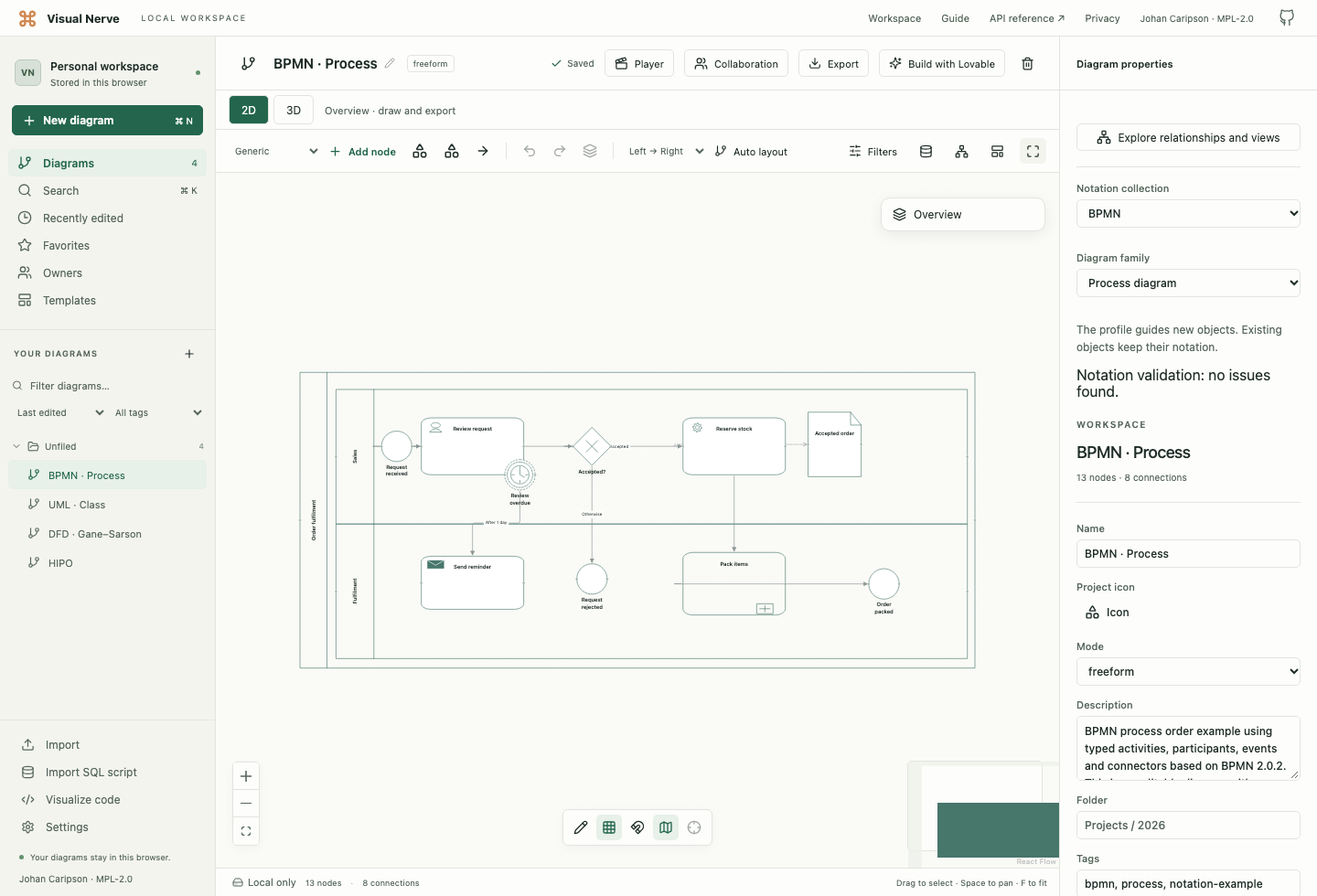
| Process | Order review in Sales and packing in Fulfilment, with an exclusive gateway, a default rejection path, a collapsed subprocess and a non-interrupting boundary timer |
| Collaboration | Separate Customer and Supplier pools, each with its own sequence flow, linked by Order and Confirmation message flows |
| Conversation | Customer, Supplier and Carrier connected to a shared order-fulfilment conversation |
| Choreography | Submit order and Arrange delivery tasks, each with initiating and other participant bands |
Choose New diagram → BPMN · … to open an editable example. In an existing ordinary diagram, choose Notation collections → BPMN and narrow Diagram family.
Activities, events and gateways
| Family | Use it when |
|---|---|
| Task | The work is one activity at the level being described; its marker distinguishes user, service, manual, send, receive, business-rule or script work |
| Subprocess | The activity has an internal process; the collapsed marker indicates hidden detail |
| Event subprocess | An event starts a subprocess within its enclosing scope, rather than normal sequence flow entering it |
| Call activity | The activity refers to reusable called work |
| Transaction | You are describing a subprocess with transaction behavior |
| Ad-hoc subprocess | Activities are modeled without a fixed complete sequence |
| Start event | An event initiates the process, or an event subprocess in its enclosing scope |
| Intermediate catching event | Work waits for a trigger such as a message or timer while the process is in progress |
| Intermediate throwing event | The process emits a result such as a message or signal while it is in progress |
| End event | A path completes, optionally with a result such as a message, error or termination |
| Boundary event | An event is attached to an activity and describes its handling path |
| Exclusive gateway | Exactly one outgoing alternative is chosen |
| Inclusive gateway | One or more alternatives can be chosen |
| Parallel gateway | Work splits or synchronizes across parallel paths |
| Event-based gateway | The next catching event determines the outgoing path |
| Complex gateway | The model requires a more complex stated synchronization rule |
Select the object to choose its task type, event definition, loop/instance marker or other available fields. Event markers have context rules: a timer can be caught, while termination is an end-event result. The palette’s saved properties are checked against the implemented BPMN event contexts.
For a boundary event, choose Attached to and select its activity. Non-interrupting uses a dashed boundary: the activity continues while the handler path starts. An interrupting boundary event interrupts the attached activity. Error, cancel and compensation do not have the non-interrupting boundary variant.
A standard loop, sequential multi-instance and parallel multi-instance are different activity markers. Sequential multi-instance uses horizontal bars; parallel multi-instance uses vertical bars. These properties describe the model and do not launch processing in Visual Nerve.
Participants and supporting data
These supporting choices complete the collection’s 32 symbol families. Event definitions, task types and activity markers refine those families through their properties.
| Choice | Use it when |
|---|---|
| Participant / pool; Lane | A Participant / pool identifies one participant, with an internal process or as a black box. A Lane partitions responsibility within that process. Keep activities in the correct containing pool or lane. |
| Data object | You identify information required or produced by an activity. A collection marker identifies several items rather than a single item. |
| Data input; Data output | You identify information crossing the process’s input or output boundary. Use ordinary Data objects for information within the process. |
| Data store | Information persists beyond the lifetime of a process instance, such as a maintained order register. |
| Message | You identify the information exchanged between participants, such as an Order or Confirmation. A Message flow separately shows who communicates with whom. |
| Group; Text annotation | A Group visually gathers related elements without changing flow. A Text annotation explains an element, assumption or rule; connect it with an Association. |
Use Data association to relate information to the work that uses or produces it. It does not determine activity order. A group and an annotation likewise add context rather than a process step.
Choreography and conversation choices
| Choice | Use it when |
|---|---|
| Choreography task | One interaction between participants is the work being described, such as Customer submitting an order to Supplier. |
| Sub choreography | A choreography activity contains a more detailed choreography. Use its collapsed state to show the interaction at a broader level. |
| Call choreography | The choreography activity invokes reusable choreography rather than defining its detail locally. |
| Choreography participant band | You identify a participant’s role in a choreography activity. The initiating participant and the other participant have distinct band appearance. |
| Conversation | You summarize related message exchanges between participants, such as an order-fulfilment conversation. Connect participants with Conversation links. |
| Sub conversation | A conversation groups more detailed conversations. Use it when the overview needs a distinct expandable conversation scope. |
| Call conversation | The view refers to reusable conversation structure instead of defining a new conversation locally. |
In a choreography activity, the three fixed sections identify the initiating participant, the activity and the other participant. The non-initiating participant band has a light fill. Keep participant information in the bands and the work in the center. Lay out expanded detail explicitly; the collapsed and call markers describe the model rather than loading another diagram automatically.
Connect the right things
| Relationship | Meaning and boundary |
|---|---|
| Sequence flow | Work order inside a process; it may cross lanes in the same participant, but must not cross pool boundaries |
| Message flow | Communication between separate participants; dashed line, source circle and open arrow |
| Data association | Information used or produced by work; dotted directed line |
| Association | Explanatory connection, for example to an annotation |
| Conversation link | A participant’s involvement in a conversation; it is not a sequence flow |
Select a sequence flow to enter its Condition or mark Default flow. A default path is the alternative used when the other conditions do not select a path. Give each condition a concrete meaning, such as request accepted, and avoid labeling every connection as a generic “next”.
Keep request and reply messages distinct when they carry different information. A message flow inside one pool, or a sequence flow between separate pools, changes the modeled meaning and should be corrected.
Review and share
Use Review notation in Document Properties to inspect selected structural issues, including references, event context and participant relationships. The checks do not prove that a process will terminate or that its business rules are complete.
Visual Nerve supports editable graphical families and marker properties based on BPMN 2.0.2. It does not execute BPMN or import/export BPMN XML, and does not claim OMG BPMN conformance. For executable arrival, capacity and queue experiments, use the separate Process Simulator . See notation editing and export behavior before choosing a portable copy.
Source
The primary reference is OMG Business Process Model and Notation, version 2.0.2 : clauses 7–11 cover the graphical families, Table 10.93 on printed pages 259–260 gives event-marker contexts, and clause 12 describes graphical depiction. OMG and BPMN names identify the published notation; Visual Nerve is not affiliated with or endorsed by OMG.