Use a code diagram to find what a script contains, which files depend on each other, and which recognized declarations may call or reference others. The result is an editable diagram; it does not execute code or replace a compiler or runtime debugger.
Preview a script or source project
- Choose Visualize code. On a phone, open Diagram actions → Visualize code.
- Enter the diagram name.
- Paste Source code and choose Source language, or use Load source files / Load source folder / Load ZIP project.
- Review the chosen language for every file. Filename, shebang and content help identify project languages. Inconclusive files need your choice.
- Choose Diagram detail and, optionally, Focus on name or path.
- Choose Preview code.
- Review recognized objects, dependencies, unresolved references and notes.
- Choose Create diagram.
Folder selection skips dependency and build output. It analyzes only supplied files; it does not crawl the computer or discover installed packages. Preview creates no project. Changing the input clears the old preview, and Cancel aborts pending work.
Choose the right level of detail
| Diagram detail | Best first question |
|---|---|
| Folder relationships | “Which areas of the project are connected?” Directory cards show descendant file counts and languages; connections combine dependencies between their folders. |
| File overview | “Which parts of this project depend on each other?” One native object per supplied file summarizes its declarations and file dependencies. |
| Declarations and dependencies | “What functions, paragraphs, classes or resources are inside this script?” Recognized declarations become separate objects with their connections. |
One script or file automatically starts with Declarations and dependencies. Multiple files start with File overview. ZIP projects start with File overview. You can choose any level explicitly.
Focus on name or path keeps objects matching part of a name or source path and their immediate related objects. For example, customer or src/payments can turn a large import into a focused starting view. Source-size limits still apply to the whole supplied project.
Import a ZIP project
- Export or compress the project as a
.zip. Exclude installed dependencies and build output where possible. - Drop the ZIP on the canvas, or choose Visualize code → Load ZIP project.
- Follow the scan/read percentage. Cancel preparation stops pending work.
- Review the scan summary: it explains which dependencies, build output, private files, binaries, generated files and unsupported files were excluded.
- Review detected languages and choose File overview, Folder relationships or Declarations and dependencies.
- Preview, inspect uncertain connections, then create the diagram.
A common enclosing folder is removed from paths. Only supplied files are inspected; code is never executed and linked documents are never downloaded. The original ZIP and source are temporary. The saved diagram contains the recognized structure and scan counts.
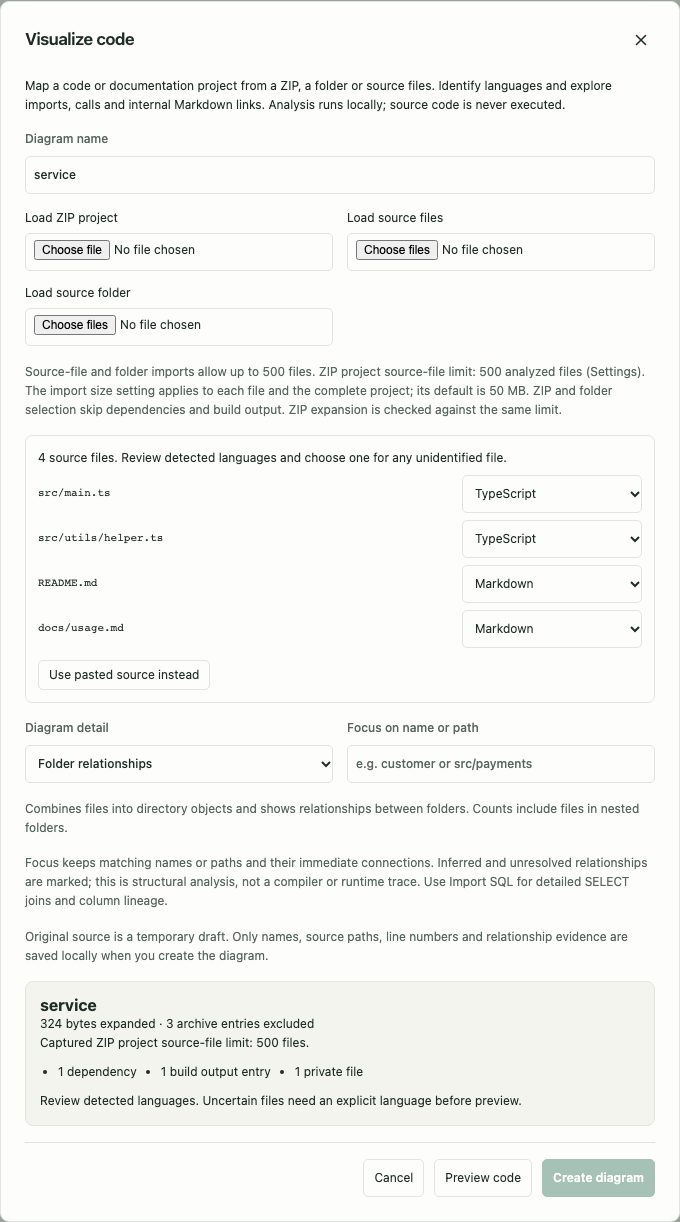
Start with Folder relationships for a broad architecture map. Select a folder to read its path, languages and file count; select a dependency to read how many source relationships it combines. Files in the same folder do not produce a folder self-link. For their individual relationships, choose File overview and preview again before creating. After closing the import draft, reload the source to create a different analysis; complete source is not retained.
Map linked Markdown documents
A ZIP of Markdown files works without programming code. For example:
handbook/
  README.md              → [Delivery](operations/delivery.md)
  operations/delivery.md → [Checklist](checklist.md#before-start)
  operations/checklist.md
The resulting file map connects README to delivery, then delivery to checklist. Relative paths, paths beginning at the project root (/), percent-encoded names, inline/reference links and [[wiki links]] are supported. Supported heading, HTML and line anchors are checked against the destination; fragments do not create extra document nodes. Unresolved internal targets remain visible for review. Links in fenced/inline code, comments, images and external web URLs are excluded.
Use a ZIP, source folder or several Markdown files for this workflow. Dropping one .md file still opens the existing Markdown diagram importer. The .mdx extension continues to mean MDX for OLAP, rather than Markdown with JSX.
Example: trace a Python helper
Load these two files together:
# billing.py
from utils import clean

def invoice():
    clean()
# utils.py
def clean():
    return 1
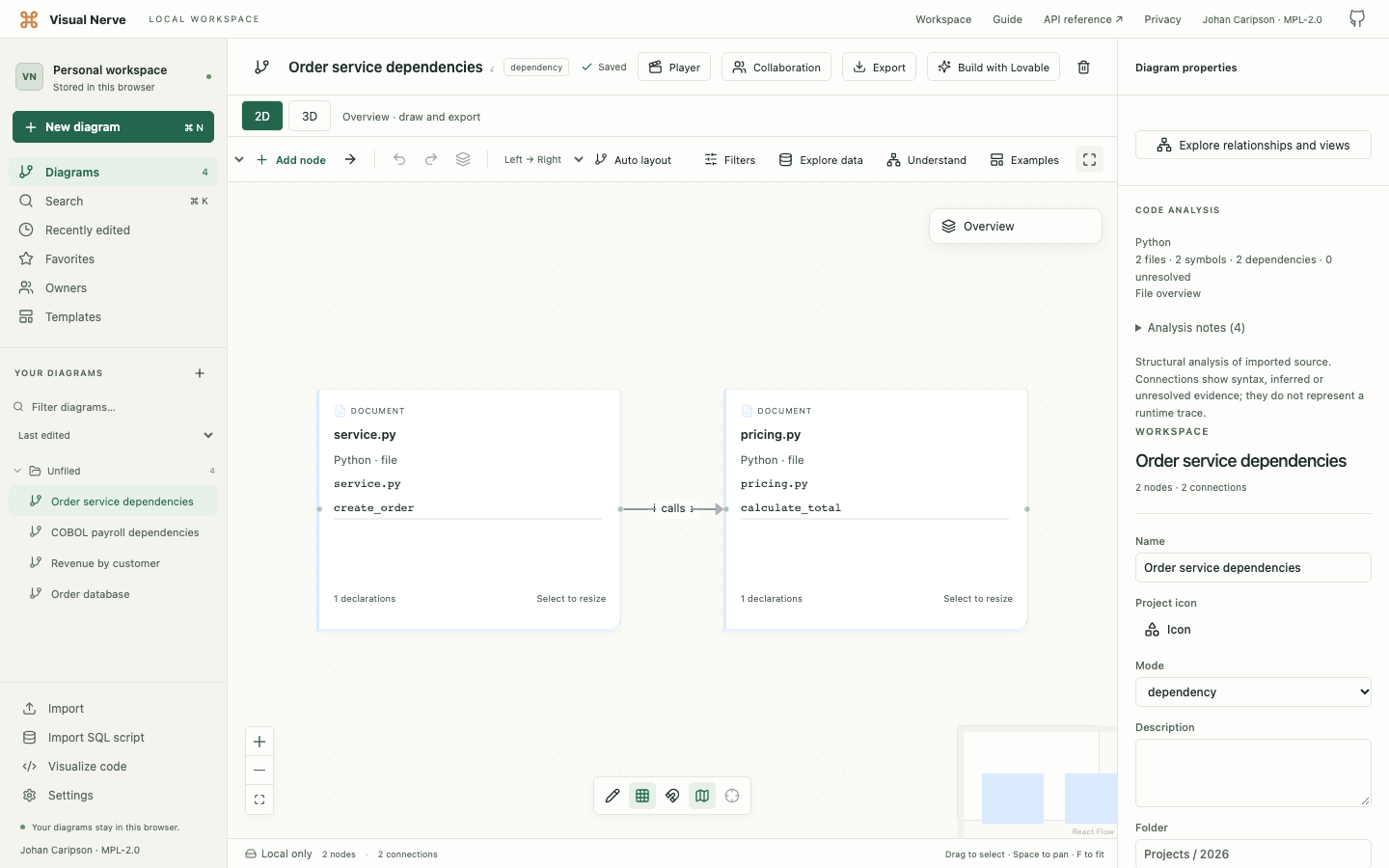
File overview gives you a billing file and a utils file with the recognized import dependency. Choose Declarations and dependencies to inspect the functions and possible call relationship. Select the connection to read its evidence and confidence rather than assuming a runtime call has been proven.
For a single pasted Python script, choose Python explicitly and begin with its recognized classes/functions. Imports outside the supplied project remain external or unresolved.
Example: understand a COBOL payroll program
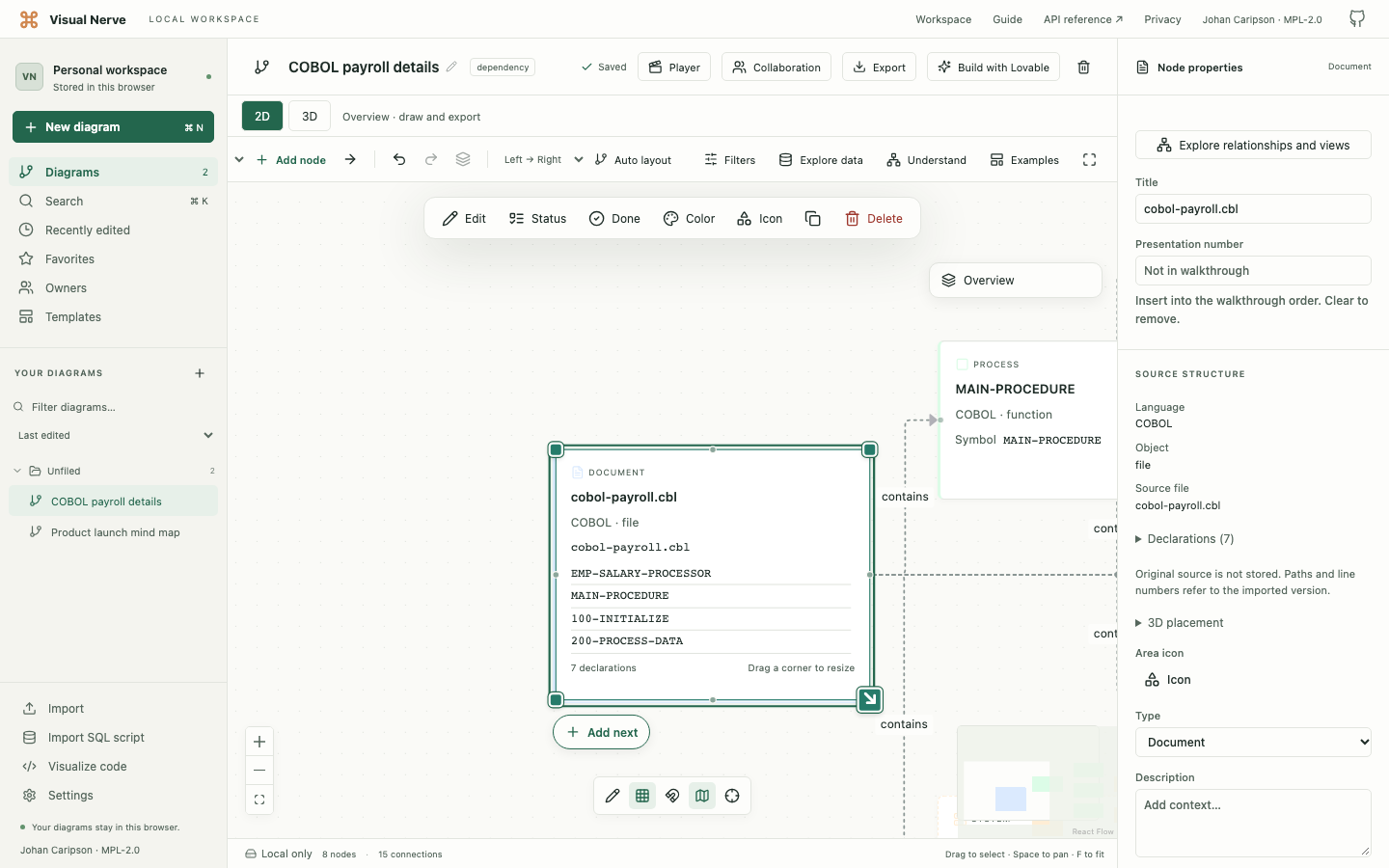
A payroll program can be easier to read as paragraphs, file resources and calls than as one long card. Choose COBOL and Declarations and dependencies.
This small structural example shows an employee input file, a report output file and numbered processing paragraphs:
IDENTIFICATION DIVISION.
PROGRAM-ID. PAYROLL.
ENVIRONMENT DIVISION.
INPUT-OUTPUT SECTION.
FILE-CONTROL.
SELECT EMPLOYEE-FILE ASSIGN TO "EMPLOYEES.DAT"
    ORGANIZATION IS LINE SEQUENTIAL.
SELECT REPORT-FILE ASSIGN TO "SALARY_REPORT.TXT"
    ORGANIZATION IS LINE SEQUENTIAL.
DATA DIVISION.
FILE SECTION.
FD EMPLOYEE-FILE.
01 EMPLOYEE-RECORD.
   05 EMP-HOURS PIC 9(3)V99.
   05 EMP-RATE PIC 9(3)V99.
FD REPORT-FILE.
01 REPORT-RECORD PIC X(80).
WORKING-STORAGE SECTION.
01 GROSS-PAY PIC 9(5)V99.
PROCEDURE DIVISION.
MAIN-PROCEDURE.
    PERFORM 100-INITIALIZE
    PERFORM 200-PROCESS-DATA
    PERFORM 300-TERMINATE
    STOP RUN.
100-INITIALIZE.
    OPEN INPUT EMPLOYEE-FILE
    OPEN OUTPUT REPORT-FILE.
200-PROCESS-DATA.
    READ EMPLOYEE-FILE
        AT END CONTINUE
    END-READ
    MULTIPLY EMP-HOURS BY EMP-RATE GIVING GROSS-PAY
    WRITE REPORT-RECORD FROM GROSS-PAY.
300-TERMINATE.
    CLOSE EMPLOYEE-FILE
    CLOSE REPORT-FILE.
The diagram recognizes the program, paragraphs and file resources. PERFORM relationships show the recognized calls. READ links concern EMPLOYEE-FILE; WRITE REPORT-RECORD is mapped through its FD record to REPORT-FILE. Inspect these edges and source locations to understand which paragraph reads or writes which file.
The example illustrates structure; the importer does not run payroll calculations, validate complete COBOL semantics or prove behavior for empty input.
Example: begin with a TypeScript project
Load src/invoice.ts and src/clean.ts:
// src/invoice.ts
import { clean } from './clean';
export function invoice(value: string) {
  return clean(value);
}
// src/clean.ts
export function clean(value: string) {
  return value.trim();
}
The default File overview explains the module relationship. Switch to Declarations and dependencies to see individual declarations. A member call such as value.trim() can depend on information outside bounded structural analysis; read unresolved notes instead of treating every method name as a verified target.
For a larger project, start with files, filter by a path, then use relationship exploration or Ask diagram to inspect a dependency path.
Read confidence and source evidence
Select an object or connection and inspect Properties. Source file paths, line locations, recognized structure and evidence help you verify the diagram against your source.
| Confidence | How to interpret it |
|---|---|
| Syntax | A recognized explicit construct, such as containment, an import or a source reference. |
| Heuristic | A possible connection inferred from names and source structure. |
| Unresolved | The target is outside the supplied files, ambiguous or cannot be safely bound. |
Unresolved relationships are dashed. An imported name is not evidence that its definition was supplied. Overloads, dynamic dispatch, reflection, generated code, macros, conditional imports, unusual multiline declarations and embedded languages can remain incomplete.
“Depends on” describes the modeled source relationship. It does not prove that changing a function will affect every path at runtime.
Read and resize code cards
In 2D:
- Scroll inside a code card to read its retained details. Long names and paths wrap.
- Select the card and drag a corner resize handle to show more at once.
- Drag the header to move the card without scrolling its body.
- Use Undo/Redo to restore a size or move; reload retains saved geometry.
A focused details region supports reading with navigation keys without nudging or deleting the diagram object. On a phone, swipe within the details body and use the selected corner handle to resize.
File cards retain up to 200 declaration names. Use Declarations and dependencies for separate objects rather than expecting a file summary to be a complete source listing.
3D faces and PNG/PDF/SVG/video exports show the top of the card at its saved size. Enlarge it in 2D to fit more details before presenting or exporting. Native JSON and backups retain all saved recognized metadata, including details beyond the visible card.
Supported languages and structures
All entries below are bounded structural analyzers. “Possible calls” are source-based candidates, not a verified runtime call graph.
| Language | File extensions | Recognized structures and relationships |
|---|---|---|
| Python | .py, .pyw | Classes/functions, imports, possible calls. |
| JavaScript | .js, .mjs, .cjs, .jsx | Classes/functions, module imports, possible calls. |
| TypeScript | .ts, .tsx, .mts, .cts | Types/classes/functions, module imports, possible calls. |
| Java | .java | Classes/methods, imports, possible calls. |
| C# | .cs, .csx | Classes/methods, using directives, possible calls. |
| C++ | .cpp, .cxx, .cc, .hpp, .hxx, .hh, .h | Types/functions, includes, possible calls. |
| C | .c, .h | Functions/types, includes, possible calls. |
| SQL | .sql, .ddl | Queries, table references and data dependencies. |
| Go | .go | Types/functions, imports, possible calls. |
| Rust | .rs | Types/functions, use/mod dependencies, possible calls. |
| PHP | .php, .phtml | Classes/functions, includes/imports, possible calls. |
| Kotlin | .kt, .kts | Classes/functions, imports, possible calls. |
| Swift | .swift | Types/functions, imports, possible calls. |
| Bash / Shell | .sh, .bash, .zsh | Functions, sourced scripts and possible commands/calls. |
| R | .r, .R | Function assignments, library/source dependencies, possible calls. |
| Dart | .dart | Classes/functions, imports, possible calls. |
| Ruby | .rb, .rake | Classes/methods, require dependencies, possible calls. |
| PowerShell | .ps1, .psm1, .psd1 | Functions, module/script dependencies, possible commands/calls. |
| DAX | .dax | Measures, table and measure references. |
| Power Query M | .pq, .m | Let steps and dependencies between steps. |
| VBA | .bas, .cls, .frm | Procedures/classes and possible calls. |
| Scala | .scala, .sc | Types/methods, imports, possible calls. |
| Lua | .lua | Functions, require dependencies, possible calls. |
| MATLAB | .m | Functions/classes and possible calls. |
| Objective-C | .m, .mm, .h | Classes/methods, imports/includes, possible calls. |
| Perl | .pl, .pm, .t | Subroutines/packages, use/require dependencies, possible calls. |
| Groovy | .groovy, .gvy, .gradle | Classes/methods, imports, possible calls. |
| Visual Basic / VB.NET | .vb, .vbproj | Classes/procedures, imports, possible calls. |
| Julia | .jl | Types/functions, using/import/include dependencies, possible calls. |
| Elixir | .ex, .exs | Modules/functions, use/import/alias dependencies, possible calls. |
| Solidity | .sol | Contracts/functions, imports, possible calls. |
| Haskell | .hs, .lhs | Types/bindings, imports, possible references/calls. |
| F# | .fs, .fsx, .fsi | Types/bindings, open dependencies, possible references/calls. |
| Clojure | .clj, .cljs, .cljc, .edn | Namespaces/definitions, require dependencies, possible calls. |
| T-SQL | .tsql | Queries, procedure outline and table dependencies. |
| PL/SQL | .pls, .pks, .pkb, .plsql | Queries, package/procedure outline and table dependencies. |
| SAS | .sas | Data/procedure steps and input/output datasets. |
| Apex | .cls, .trigger | Classes/methods, possible calls. |
| ABAP | .abap | Classes/methods/forms, calls and table dependencies. |
| COBOL | .cob, .cbl, .cpy | Programs, numbered paragraphs, calls and file reads/writes through FD record mappings. |
| Fortran | .f, .for, .f90, .f95, .f03, .f08 | Modules/procedures, use dependencies and possible calls. |
| Assembly | .asm, .s | Labels, includes and calls/jumps. |
| Delphi / Object Pascal | .pas, .pp, .dpr | Units/types/procedures, uses dependencies, possible calls. |
| GDScript | .gd | Classes/functions, preload/load dependencies, possible calls. |
| GraphQL | .graphql, .gql | Operations/fragments/types, schema fields and named references. |
| MDX | .mdx | Measures, cubes and bracketed references. |
| Cypher | .cypher, .cql | Query patterns, labels and named relationships. |
| Vega / Vega-Lite | .vg.json, .vl.json, .vega.json, .vegalite.json | Named datasets, transforms and data references. |
| HCL | .tf, .tfvars, .hcl | Resources/modules/variables/outputs and references. |
| Nix | .nix | Bindings, imports and references. |
| Markdown | .md, .markdown | Internal inline/reference/wiki document links. |
Choose the language explicitly for .m (MATLAB, Objective-C or Power Query M), .h and .cls when detection remains inconclusive. Use T-SQL or PL/SQL for those dialect scripts; .sql alone selects SQL. Rakefile/Gemfile are recognized as Ruby and Jenkinsfile as Groovy. Ordinary diagram JSON is not a Vega source file.
For detailed SELECT joins, column lineage or table constraints, use Import SQL rather than the general code outline.
Limits, saved information and sharing
The default limit is 50 MB per file and 50 MB for the complete source project. Both use Settings → Import file size, adjustable to 1024 MB (1 GB). Imports up to 50 MB are supported and guaranteed; larger ones are experimental and can exceed browser memory.
Other limits remain 500 files for ordinary source/folder imports, 10,000 extracted symbols, 5,000 diagram objects and 10,000 connections. Source limits are 100,000 lines per file, 500,000 lines per project and 20,000 characters per line. ZIP scanning has a two-minute deadline, followed by the 30-second analysis deadline. ZIP archives allow up to 10,000 entries; compressed bytes and all expanded entries must each fit your selected import limit. Corrupt, encrypted, ZIP64, symlink, unsafe-path and unsupported archives are rejected. Focus narrows the diagram, not these source limits.
The original code is a temporary import draft. Creating saves recognized names, paths, source locations, summaries, structural identifiers, confidence, relationship evidence and notes in local IndexedDB. Complete source, comments and ordinary nonstructural strings/numbers are not saved. Quoted imports, table names, resource names or fields may remain as structural identifiers.
Source files are not attached to backups or kept for automatic re-analysis. After code changes, import again to create a new analysis. Existing diagrams retain their saved detail level.
Paths and identifiers can still be sensitive. Native JSON/backups preserve recognized metadata; Markdown and Lovable include their recognized code contract and uncertainty. Review the exact shared output.
ZIP projects have a separate Settings → ZIP project source-file limit . It defaults to 500 analyzed files and accepts whole numbers up to 10,000. Only up to 500 are supported and guaranteed; larger projects are experimental. The import draft/preview shows a warning and the scan summary records the captured budget. Change Settings before loading the archive again. The 10,000-entry ZIP ceiling includes ignored files and directory records; byte, line, object, connection and time limits remain independent. Use Folder relationships for large projects. Saved larger diagrams still reopen after resetting the preference to 500.
If the result is incomplete
| Symptom | Next step |
|---|---|
| A file cannot be identified | Choose its language explicitly. |
| A dependency points outside the project | Supply its source if available, or keep it as external context. |
| A function has several possible targets | Read its confidence/evidence; structural analysis cannot safely resolve every overload or dispatch. |
| Only file cards appear | Choose Declarations and dependencies, preview again and create the desired analysis. |
| A card seems truncated | Scroll its details, enlarge it, or inspect Properties. |
| Too many objects or a timeout | Begin with File overview, import a smaller source set or refine focus; review the explicit error. |
The API/MCP integration lists the same 50 code languages plus Markdown and uses the same local analyzer. Preview permits read-only access; creating or resizing saved objects requires write access. Raising the file limit does not raise the 32 MiB integration transport envelope.
Continue with Understand large diagrams , Connected data and analysis views , or Sharing and Lovable .