HIPO means Hierarchy plus Input–Process–Output. Use it to explain a system’s functions from the broad purpose down to detailed inputs, processing steps and results. A HIPO package contains a visual table of contents and the IPO charts that it identifies.
Read the three views
| View | What it tells the reader | Example |
|---|---|---|
| Visual Table of Contents (VTOC) | Which functions belong under a broader function and which chart number describes each one | Fulfil order → Validate request, Reserve stock, Confirm delivery |
| Overview IPO | The major inputs, function steps and outputs at one level | Order request and stock balance → fulfilment functions → accepted order and delivery confirmation |
| Detail IPO | Numbered steps with more specific inputs and results, plus explanations keyed to those steps | Check quantity → allocate available items → record the reservation |
The VTOC hierarchy is a table of contents, not a schedule. Its left-to-right placement does not state execution order. The IPO charts explain the functions that the hierarchy names.
Work through the example
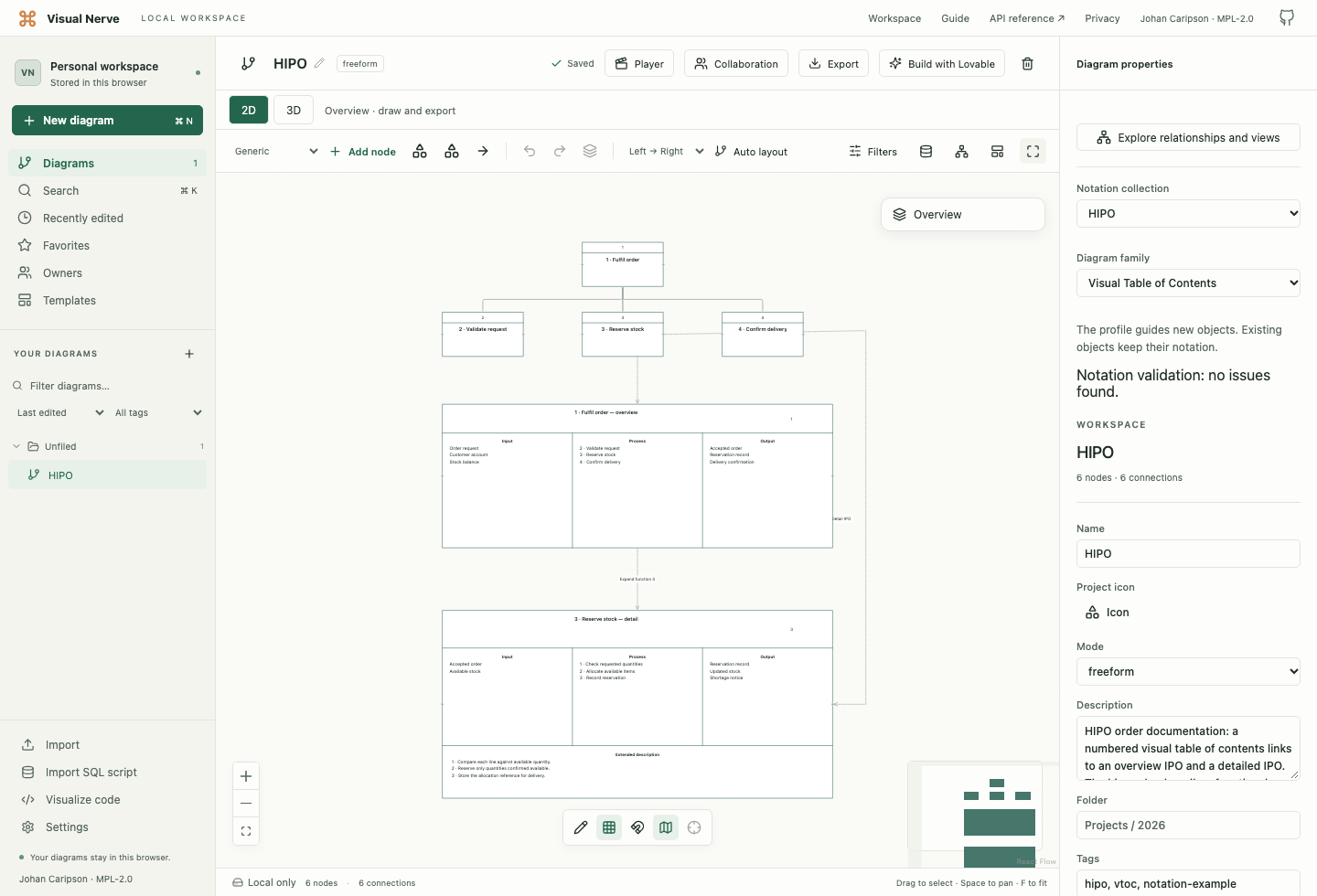
- Choose New diagram → HIPO. The upper part is the numbered VTOC; the two charts below are its overview and the detail for reserving stock.
- Select Reserve stock. Edit Module number and the title, and inspect Related module or classifier, which references its detail chart.
- Select the overview IPO chart. Edit the input, process and output section entries under Notation properties. Keep the process numbers consistent with the VTOC modules.
- Select the detail IPO chart. Update its numbered process steps and the matching Extended description entries. Describe the rule or implementation detail that the short step name cannot convey.
- Review the reference relationships, then use Fit diagram and zoom into one chart to read it.
To build your own package, open Notation collections, choose HIPO, and narrow Diagram family to VTOC, Overview IPO or Detail IPO. You can keep these related views in one document; the document profile does not prohibit another explicit HIPO view on an object.
An overview IPO has three fixed sections: Input, Process and Output. A detail IPO adds Extended description as its fourth section. Use those regions for the function’s information, and enlarge the chart if its entries need more room.
Choose a HIPO symbol or relationship
| Choice | Use it when |
|---|---|
| VTOC module | A function needs a numbered place in the hierarchy |
| VTOC module reference | The drawing refers to a function described elsewhere |
| Input / Process / Output chart | You need the three aligned areas of a function description |
| Data area | You identify a record, field, table, parameter list or working area |
| Module hierarchy | One functional description is decomposed into lower-level descriptions |
| Data flow | Data is available to a processing step or moves to a working area; the broad outlined arrow identifies data movement |
| Alteration flow | A step updates data that already exists; the outlined arrow’s hatch distinguishes alteration from ordinary data flow |
| Action flow | The detail chart needs an explicit progression through numbered steps; the heavy arrow identifies action |
| Reference | The reader should inspect a related chart, explanation or expanded detail; the dotted arrow identifies the reference |
The palette also offers classic media as presentation aids:
| Media | Use it to identify |
|---|---|
| Document / report | A readable report or document |
| Manual input | Information entered through a keyboard, switches or buttons |
| Display | Information presented by a display device |
| Online storage | Information held in accessible online storage |
| Magnetic tape | Information held on magnetic tape |
| Punched card | Information carried on a punched card |
| Magnetic disk | Information held on magnetic disk |
Their meanings and outlines follow IBM’s classic flowchart vocabulary. They supplement the function charts; they are not a verified reconstruction of every aperture in the historical HIPO stencil.
Keep the package consistent
Give every module a stable number and a clear function name. Start with the overview, then expand only functions that need more explanation. Keep an input name consistent wherever it is reused. Make each detail’s numbered explanation identify the process step it describes.
Use a reference for “read this other chart” and a hierarchy relationship for “this function decomposes into those functions”. These are different claims. Write implementation pointers in the description or a detail section when a chart needs to identify a routine or label.
HIPO in Visual Nerve is editable documentation. It does not generate programs or execute the depicted operations. The collection guide explains object properties, references, ports, review and export behavior.
Historical sources
IBM’s HIPO — A Design Aid and Documentation Technique, GC20-1851 (1974; second edition 1975), is the historical publication associated with the method. The implemented structural reference is the accessible IBM Improved Programming Technologies — An Overview, GC20-1850-0, Chapter 5, printed pages 13–17 , including overview, detail and VTOC figures. The IBM Preparing Method of Operation Diagrams — The HIPO Method, TR00.2209, printed pages 11–17 supplies the distinction between data, action, alteration and reference relationships.
The supplemental media use the definitions in IBM Flowcharting Techniques, GC20-8152-1, printed pages 3–4 . See classic flowchart symbols for their construction and distinctions.
IBM is a trademark of International Business Machines Corporation. Visual Nerve is not affiliated with or endorsed by IBM.